Headless CMS vs. Traditional CMS – When Is It Worth Switching?

TL;DR: „A Headless CMS separates content from presentation and delivers content via API to any number of channels. Traditional CMS like WordPress are easier to set up but less flexible. The right choice depends on team size, channel strategy, and technical expertise."
— Till FreitagWhat Exactly Is a Headless CMS?
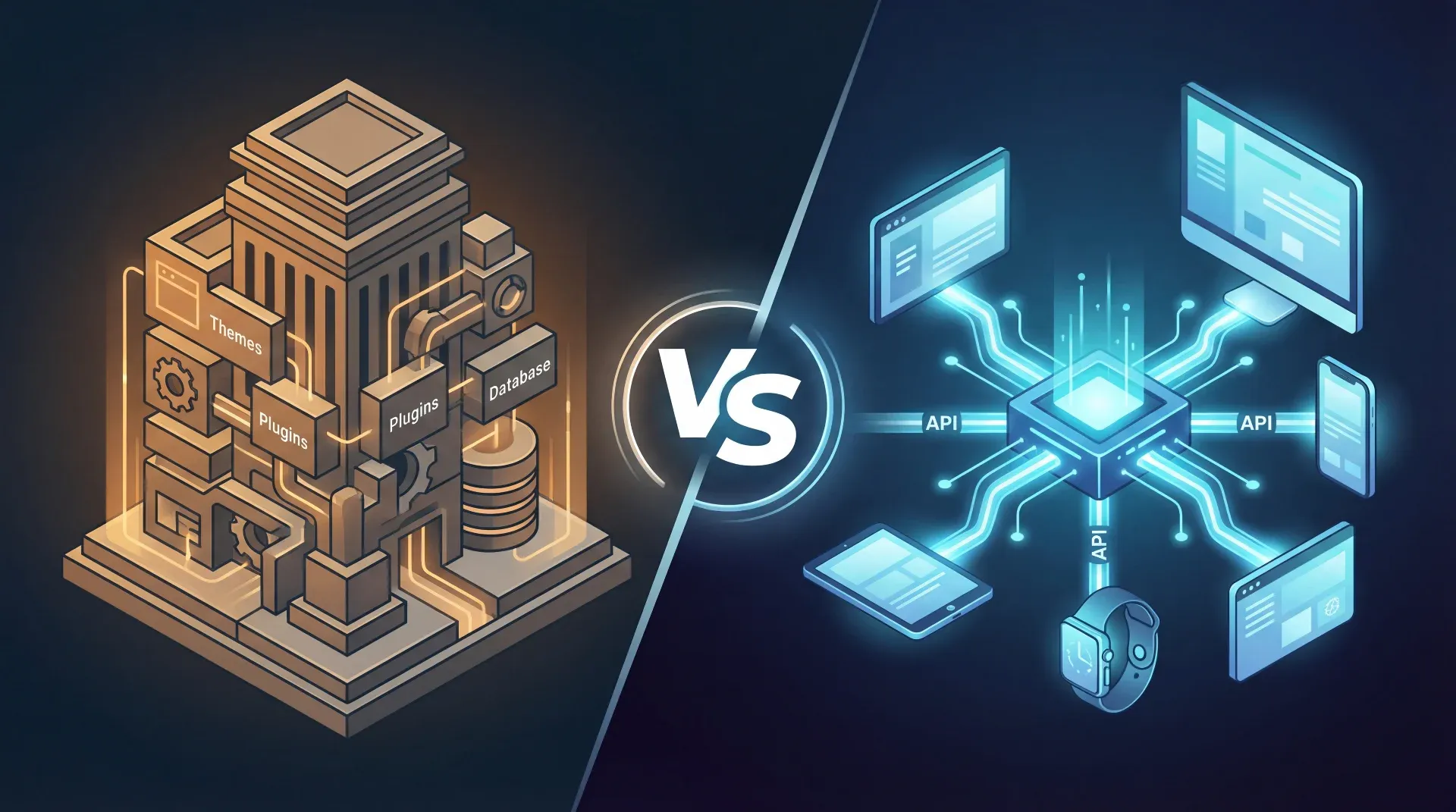
With a traditional CMS (WordPress, Typo3, Drupal), backend and frontend are tightly coupled. You write content in the admin panel, and the CMS renders the finished page – including theme, plugins, and everything else.
A Headless CMS only does half the job: it manages content and delivers it via an API (REST or GraphQL). The frontend? You build it separately – with React, Next.js, Astro, or whatever fits your stack.
Headless = Content without a predetermined face. You decide the presentation.
Traditional Architecture: Proven but Limited
Advantages
- Quick start: WordPress installed in 10 minutes, theme activated, done
- Massive ecosystem: 60,000+ plugins for every use case
- No developers needed: Marketing teams can publish independently
- SEO out of the box: Yoast, RankMath & Co. handle the heavy lifting
Disadvantages
- Monolith problem: Content and presentation are glued together – redesigns become open-heart surgery
- Performance: Plugin bloat, server-side rendering on every request, cache complexity
- Security: WordPress is attack target #1 – regular updates are mandatory
- Multi-channel? Forget it. Your content is trapped in HTML templates
Headless Architecture: Flexible but Demanding
Advantages
- Omnichannel: One content repository, unlimited frontends – web, app, digital signage, chatbot
- Free tech choice: React, Vue, Svelte, Astro – you choose the stack, not the CMS
- Performance: Static pages via SSG (Static Site Generation) load in milliseconds
- Security: No exposed admin URL, no PHP, minimal attack surface
- Scalability: CDN edge delivery instead of centralized servers
Disadvantages
- Higher entry barrier: Requires developers or technical know-how
- No WYSIWYG: Editors don't see how content looks on the page
- More infrastructure: Build pipelines, hosting, API management – all separate
- Costs: Many headless CMS providers charge per API call or user
Head-to-Head Comparison
| Criterion | Traditional CMS | Headless CMS |
|---|---|---|
| Time-to-Market | ⚡ Fast (themes, plugins) | 🐢 Slower (custom frontend) |
| Flexibility | ⚠️ Template-bound | ✅ Any frontend |
| Performance | ⚠️ Server-dependent | ✅ Edge/CDN-optimized |
| Editor UX | ✅ WYSIWYG, intuitive | ⚠️ Structured fields, no preview |
| Security | ❌ Large attack surface | ✅ Minimal attack surface |
| Multi-Channel | ❌ Web only | ✅ Web, app, IoT, etc. |
| Cost (Start) | ✅ Cheap/free | ⚠️ Development costs |
| Cost (Operations) | ⚠️ Hosting + updates + security | ⚠️ API costs + hosting |
Popular Headless CMS Solutions
SaaS (Hosted)
- Contentful – Enterprise standard, GraphQL API, strong ecosystem
- Sanity – Real-time collaboration, GROQ query language, generous free tier
- Storyblok – Visual editor (solves the WYSIWYG problem), EU hosting available
- Hygraph (formerly GraphCMS) – GraphQL-native, federation for multiple sources
Open Source (Self-Hosted)
- Strapi – Node.js, REST + GraphQL, plugin system, large community
- Directus – Wrapper around existing SQL databases, no vendor lock-in
- Payload CMS – TypeScript-first, code-driven config, Next.js integration
- Ghost – Focus on publishing, built-in membership system
When Is Switching Worth It?
Stay with a traditional CMS if…
- You run a simple website or blog
- Your team lacks technical expertise and doesn't plan to build it
- You only serve one channel (web)
- Budget and timeline are tight – a WordPress theme goes live in hours
Switch to headless if…
- You serve multiple channels with the same content (web + app + newsletter + …)
- Performance is business-critical (e-commerce, media, SaaS)
- Your development team prefers a modern stack
- You redesign frequently without wanting to touch the content
- Security and compliance (GDPR, EU hosting) are high priority
The Hybrid Approach: Best of Both Worlds
More and more CMS offer a hybrid mode: WordPress with WPGraphQL, Drupal with JSON:API, or Storyblok with Visual Editor. You get the editor UX of a traditional CMS and the flexibility of an API.
Even monday.com can serve as a lightweight content hub: boards as editorial calendars, automations for approval workflows, and the monday API for delivery to external systems. Not a full-fledged CMS – but for structured content like campaigns, events, or product data, it's often more than enough.
Conclusion: There Is No "Better" – Only "Better for You"
The choice between headless and traditional CMS isn't a matter of belief. It's an architecture decision that depends on your requirements:
- Simplicity → Traditional CMS
- Flexibility → Headless CMS
- Both → Hybrid approach
What matters isn't the technology – it's whether your content reaches your audience. Quickly, securely, and in the right format.
Considering a CMS switch for your business? Let's talk – we'll help you find the right architecture.
📚 More on this topic: Find all articles on headless CMS, Jamstack & API-first in our Headless CMS hub for AI First Builders.
Related Articles
Do You Even Need a CMS When You Build with Lovable?
Lovable ships with a database, an editor, and Git integration. Do you even need a classic CMS on top? An honest decision…
Read moreHeadless CMS for Lovable Sites: When It's Worth It – and Which One Fits
Building with Lovable and considering a headless CMS? Here's the honest guide: which CMS fit React-Vite-SSG sites, when …
Read more
EmDash: Cloudflare's Answer to WordPress – CMS on Serverless Steroids
Cloudflare released EmDash, a full-stack TypeScript CMS on Astro running on D1, R2, and Workers. Plugin sandboxing, stru…
Read more
Why Nobody Will Use WordPress and Webflow in the Future
WordPress dominated for 20 years, Webflow was the designer's darling – but AI-native tools like Lovable are making both …
Read more
superglue.ai – The AI-Native Integration Platform That Finally Connects Enterprise Systems
superglue.ai replaces brittle SQL scripts and cron jobs with AI-powered enterprise integrations. Open source, Y Combinat…
Read more
Cloudflare's Real Play – Why EmDash Isn't a CMS Product, It's an Infrastructure Trojan Horse
Cloudflare didn't launch a CMS. They laid the bait to establish D1, R2, and Workers as the default backend of the AI bui…
Read more
Tool Selection: Finding the Needle in the Haystack – Our Evaluation Framework
How do you find the right SaaS tool when the market is overflowing with options? Our 7-criteria framework for the longli…
Read more
API Integration for SMBs – Connecting Systems Without the Chaos (Practical Guide)
APIs connect your tools into one system. We show how SMBs plan, implement, and maintain API integrations – with practica…
Read more
Agent Harness as a Category: Why the Harness Is the New Product
The harness — skills, sandbox, subagents, memory, channel routing — is the real product layer above the model. A map of …
Read more