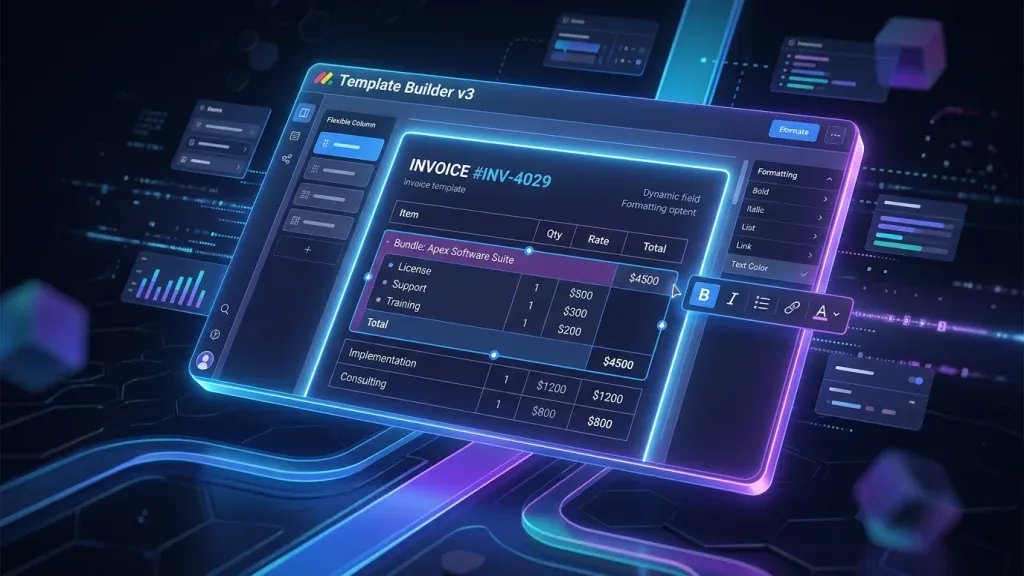
monday CRM Quotes & Invoices: Template Builder v3 Finally Makes Proposals Professional

TL;DR: „Template Builder v3 solves the #1 frustration with Quotes & Invoices: formatting now persists, products can be saved as bundles, and the editor matches the familiar monday docs WYSIWYG experience."
— Till FreitagThe Problem: Formatting That Never Stuck
Anyone who's used Quotes & Invoices in monday CRM knows the feeling: you carefully design a quote, choose the right formatting, save the template – and when you create the document, everything looks different. Bold text gone, column widths reset, spacing chaotic.
This was the #1 complaint from Q&I users. And this is exactly what Template Builder v3 addresses.
What Is Template Builder v3?
Template Builder v3 is a fundamental redesign of the quote and invoice editor in monday CRM. The key difference: the editing experience now aligns with monday docs' WYSIWYG editor (formerly Workdocs).
This means:
- What you see in the template is what you get in the final document
- No more formatting surprises
- A familiar editing experience for anyone already using monday docs
The Three Key Improvements
1. Product Bundles Directly in Templates
Previously, you had to assemble products manually for every quote. Now you can:
- Save products from deals: Store your most common product combinations as reusable building blocks
- Create bundles: Package related products together
- Automate pricing: Bundle prices are calculated automatically
Real-world example: You regularly offer a "Digital Starter Kit" – CRM setup, 5 hours of training, 3 months of support. Instead of manually adding three line items each time, just select your saved bundle.
2. Flexible Column Sizes
Long product descriptions used to be a layout nightmare. The new editor allows:
- Individual column widths: Make the description column wider, the price column narrower
- Responsive adjustment: Layout adapts to content
- Consistency: Once configured, column settings persist in the template
3. Rich Text Formatting That Persists
The core of the update:
- Bold, underline, italic: All standard formatting saves reliably
- Spacing and line height: Controlled line spacing for a professional look
- Template persistence: Formatting in template = formatting in document. Period.
Why This Matters: The Sales Context
Quotes are the last step before closing. A professionally formatted quote signals competence. When formatting randomly disappears, it looks unprofessional – regardless of how good your product is.
The Workflow Before v3
Deal won → Open template → Manually enter products →
Adjust formatting → Create document → Formatting broken →
Manually fix → Send to client
The Workflow With v3
Deal won → Select template with bundle → Review →
Create document → Perfectly formatted → Send
Time saved per quote: 10-15 minutes – with 20 quotes per month, that's over 4 hours.
Integration With the CRM Ecosystem
Template Builder v3 isn't an isolated feature. It fits seamlessly into monday CRM's Account360 strategy:
| Data Source | Automatically in Quote |
|---|---|
| CRM contacts | Company name, contact person, address |
| Deal data | Deal value, stage, expected close date |
| Product board | Prices, descriptions, SKUs |
| Activities | Recent interactions (for personalized cover letters) |
Synergy With AI Agents
Combined with CRM AI Agents, a powerful workflow emerges:
- Lead Scorer identifies purchase-ready leads
- Follow-up Agent automatically creates the quote with the right template
- Pipeline Guardian monitors quote status and escalates on inactivity
Template Strategy: Best Practices
Recommended Template Structure
Create at least these three base templates:
- Quick Quote: For standard products – minimal text, focus on pricing table
- Solution Proposal: For complex offers – with introduction, problem analysis, solution proposal
- Renewal Offer: For existing customers – with reference to past collaboration
Branding Tips
- Logo: Use the header section for your company logo
- Colors: Stick to a maximum of 2 accent colors
- Font sizes: Headings significantly larger than body text (hierarchy)
- Footer: Legal notices, T&C reference, validity period
Rollout and Availability
Template Builder v3 is being released as a gradual rollout:
- Phase 1 (current): First accounts get access
- Phase 2: Expansion to all Pro and Enterprise plans
- Phase 3: General availability
Don't see the update yet? That's normal – monday rolls out gradually. If you want earlier access, contact your monday.com Account Manager or reach out to us for guidance.
Conclusion
Template Builder v3 isn't a revolution – it's an overdue correction. But that's exactly what makes it valuable: it eliminates a daily frustration and finally makes the quoting process in monday CRM reliably professional.
The combination of WYSIWYG editing, product bundles, and persistent formatting means: less time fixing layouts, more time building customer relationships.
Next in the series: monday Vibe Apps – Build Custom Mini-Applications Without Code
Related Articles

Account360 & Zero Update CRM: The Future of monday CRM (2026)
Account360 delivers the full customer view, Zero Update CRM eliminates manual data entry. How monday CRM is revolutioniz…
Read more
Freshsales vs. monday CRM – Honest CRM Comparison 2026
Freshsales or monday CRM? We compare features, pricing, and AI capabilities – and show which CRM really fits your team i…
Read more
Close vs. monday CRM – Honest Comparison 2026
Close or monday CRM? We compare both systems honestly – features, pricing, strengths, and which tool is actually the rig…
Read moreHubSpot vs. monday CRM – Marketing CRM Comparison 2026
HubSpot Sales Hub or monday CRM? We compare platform scope, automation, reporting, and pricing in 2026 – and show which …
Read morePipedrive vs. monday CRM – CRM Comparison 2026
Pipedrive or monday CRM? We compare both CRM systems in 2026 – features, pricing, strengths, and who each tool is really…
Read more
monday CRM as Zendesk Sell Alternative – Migration & Comparison 2026
Zendesk Sell is discontinued. Learn why monday CRM is the best alternative and how to migrate in 5 steps.…
Read more
Revenue Royale Berlin: Our Table with monday.com – Plus a Workshop on the Same Day
On June 11 we're co-hosting a table with monday.com at Revenue Royale in Berlin – and delivering the 'Buy vs. Build' wor…
Read moreRevenue Royale Workshop: Buy vs. Build – Why Your Custom CRM Was a Mistake
On June 11, Alena Zidek (monday.com) and Malte Lensch (Till Freitag) deliver the 'Buy vs. Build' workshop at Revenue Roy…
Read more
GTM Engineering: What It Is, Why It Changes Sales, and How to Get Started
GTM Engineering replaces manual sales work with technical workflows – from lead enrichment and AI scoring to automated o…
Read more