
monday.com Automatisierungen Deep-Dive: 200+ native Rezepte, die euch Stunden sparen

TL;DR: „Ihr braucht kein externes Tool für 80 % eurer Automatisierungen. monday.com hat über 200 native Rezepte – und die meisten Teams nutzen davon vielleicht fünf."
— Till FreitagWarum native Automatisierungen unterschätzt werden
Die meisten Teams denken bei „Automatisierung" sofort an Make, Zapier oder n8n. Verständlich – diese Tools sind mächtig. Aber sie übersehen dabei, was direkt in monday.com steckt: über 200 native Automatisierungsrezepte, die ohne Setup, ohne Drittanbieter-Account und ohne laufende Kosten funktionieren. (Für den großen Überblick über Workflow-Automatisierung allgemein – inklusive Middleware-Vergleich – empfehlen wir unseren Grundlagenartikel Workflow-Automatisierung.)
Der Vorteil: Native Automatisierungen laufen innerhalb der Plattform, sind sofort aktiv und brauchen null Wartung. Kein API-Token, das abläuft. Kein Webhook, der still stirbt.
Wie Automatisierungen in monday.com funktionieren
Jede Automatisierung besteht aus drei Bausteinen:
- Trigger – Was löst die Automatisierung aus? (z. B. Statusänderung, Datum erreicht, Element erstellt)
- Bedingung (optional) – Unter welchen Umständen? (z. B. nur wenn Priorität = Hoch)
- Aktion – Was soll passieren? (z. B. Person zuweisen, Benachrichtigung senden, Element verschieben)
Das Prinzip ist simpel: Wenn X passiert → dann mache Y. Die Stärke liegt in der Kombinierbarkeit.
Automatisierungen werden immer pro Board angelegt. Jedes Board hat seinen eigenen Satz an aktiven Rezepten, die ihr unter Board-Einstellungen → Automatisierungen verwaltet.
Die wichtigsten Kategorien im Überblick
1. Status-basierte Automatisierungen
Die mit Abstand meistgenutzten Rezepte. Sie reagieren auf Spaltenänderungen:
- Wenn Status sich ändert → Person zuweisen: Perfekt für Übergaben zwischen Teams
- Wenn Status = Done → Element in Gruppe verschieben: Hält euer Board aufgeräumt
- Wenn Status = Stuck → Benachrichtigung an Manager: Eskalation ohne Micromanagement
- Wenn alle Unterelemente = Done → Eltern-Status auf Done setzen: Rollup-Logik ohne manuelles Tracking
2. Datum-basierte Automatisierungen
Deadlines, die sich selbst managen:
- X Tage vor Fälligkeitsdatum → Erinnerung senden: Nie wieder vergessene Deadlines
- Wenn Datum erreicht und Status ≠ Done → Status auf Überfällig setzen: Automatisches Flagging
- Jeden Montag → neues Element erstellen: Wiederkehrende Tasks ohne Copy-Paste
- Wenn Datum vorbei → Element archivieren: Selbstreinigende Boards
3. Element-basierte Automatisierungen
Reagieren auf das Erstellen, Duplizieren oder Verschieben von Elementen:
- Wenn Element erstellt → Standardwerte setzen: Konsistente Daten ab Tag eins
- Wenn Element erstellt → in Slack-Channel posten: Echtzeit-Sync ohne Umwege
- Wenn Element in Board verschoben → Status zurücksetzen: Saubere Übergänge zwischen Workflows
4. Personen-basierte Automatisierungen
Zuweisung und Verantwortlichkeit automatisieren:
- Wenn Person zugewiesen → Benachrichtigung senden: Kein „Hab ich nicht gesehen"
- Wenn Status sich ändert → Person ändern: Automatische Übergabe an den nächsten Verantwortlichen
- Wenn Element erstellt → Ersteller als Owner zuweisen: Self-Service-Workflows
5. Cross-Board-Automatisierungen
Hier wird es strategisch – Automatisierungen, die boardübergreifend arbeiten:
- Wenn Status sich ändert → Element in anderem Board erstellen: Übergabe zwischen Abteilungen
- Wenn Status sich ändert → Spalte in verbundenem Board aktualisieren: Echtzeit-Sync ohne Dashboards
- Element spiegeln: Änderungen werden bidirektional synchronisiert
6. Integrations-Automatisierungen
Native Verbindungen zu externen Tools – ohne Make oder Zapier:
- Gmail/Outlook: E-Mail senden bei Statusänderung
- Slack: Nachricht in Channel bei Trigger
- Jira: Zwei-Wege-Sync zwischen monday und Jira
- GitHub: Issue erstellen bei neuem Element
- Twilio: SMS senden bei kritischen Events
- HubSpot: Kontakte synchronisieren
Fortgeschrittene Patterns: So nutzen Profis Automatisierungen
Pattern 1: Mehrstufige Eskalation
Wenn Status = "Stuck" für mehr als 2 Tage
→ Benachrichtige Team Lead

Wenn Status = "Stuck" für mehr als 5 Tage
→ Benachrichtige Abteilungsleiter
→ Setze Priorität auf "Kritisch"
Pattern 2: Automatischer Approval-Workflow
Wenn Status = "Review angefragt"
→ Weise Approver zu
→ Sende Benachrichtigung mit Link

Wenn Status = "Approved"
→ Verschiebe in Gruppe "Ready for Launch"
→ Erstelle Task in Marketing-Board
→ Slack-Nachricht an #launches
Pattern 3: Self-Service Onboarding
Wenn neuer Mitarbeiter (Element erstellt)
→ Erstelle 12 Unterelemente aus Vorlage
→ Weise HR-Buddy zu
→ Setze Startdatum + 30/60/90-Tage-Milestones
→ Benachrichtige IT für Account-Erstellung
Pattern 4: SLA-Tracking
Wenn Support-Ticket erstellt
→ Starte Timer-Spalte
→ Setze SLA-Deadline basierend auf Priorität

Wenn Timer > SLA-Limit
→ Status auf "SLA Breach"
→ Eskalation an Support Lead
Der Automation Hub: Zentrale Übersicht über alle Automatisierungen
Seit 2025 bietet monday.com den Automation Hub – eine zentrale Stelle, an der ihr alle Automatisierungen und Workflows eures gesamten Accounts auf einen Blick seht. Statt euch durch jedes Board einzeln zu klicken, zeigt der Hub:
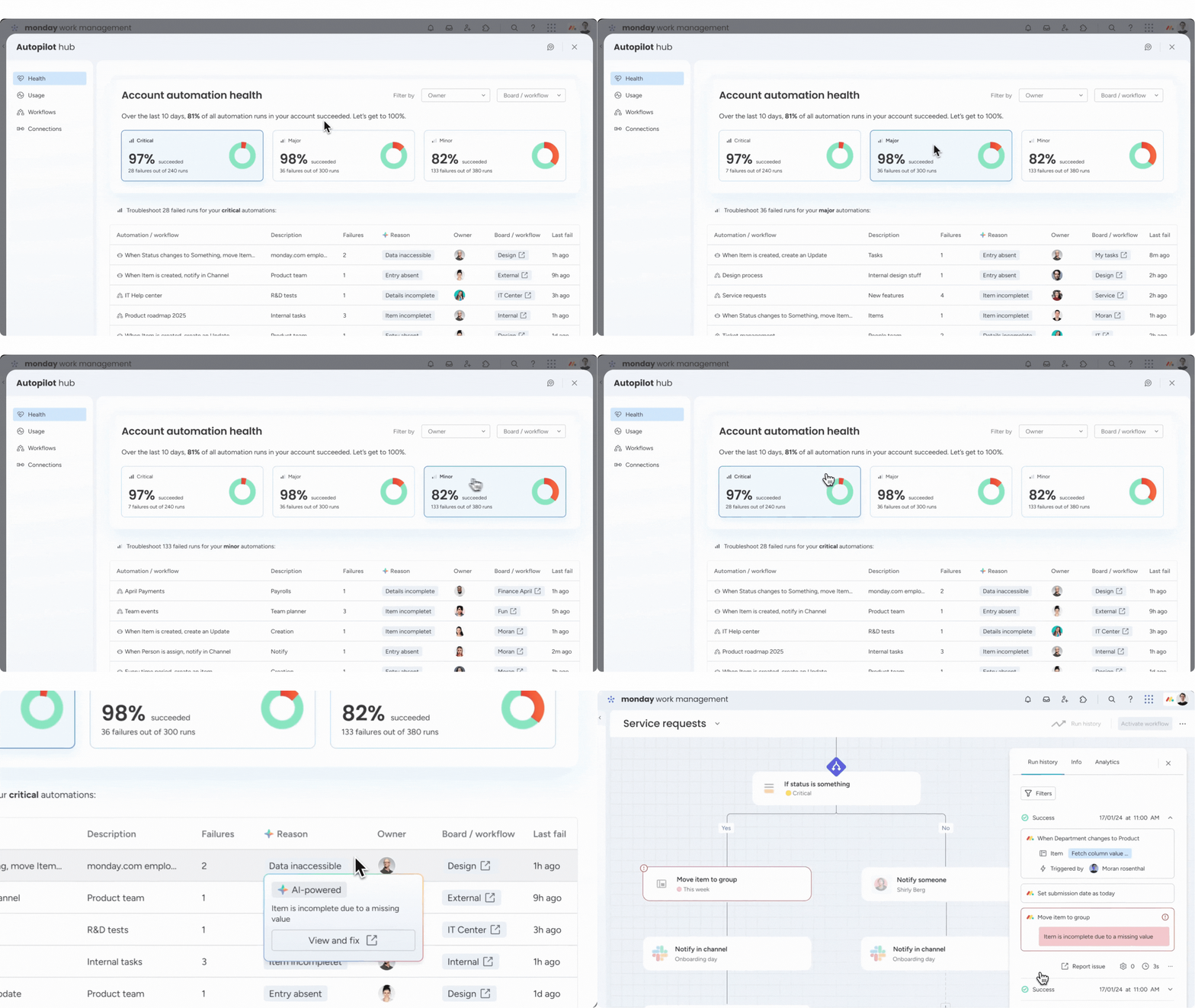
- Alle aktiven Automatisierungen über alle Boards hinweg
- Laufhistorie und Fehlerprotokolle: Welche Automatisierungen haben gefeuert, welche sind fehlgeschlagen?
- Verbrauchte Aktionen: Wie viele eurer monatlichen Aktionen sind bereits aufgebraucht?
- Filter und Suche: Nach Board, Ersteller oder Typ filtern
Der Automation Hub macht es deutlich einfacher, den Überblick zu behalten – besonders in größeren Organisationen mit Hunderten von Boards und Dutzenden aktiver Automatisierungen.
Limits und Best Practices
Aktuelle Limits (Stand März 2026)
| Plan | Aktionen pro Monat | Boards mit Automatisierungen |
|---|---|---|
| Standard | 250 | Unbegrenzt |
| Pro | 25.000 | Unbegrenzt |
| Enterprise | 250.000 | Unbegrenzt |
Best Practices
- Dokumentiert in einem eigenen Board: Ein Meta-Board mit allen aktiven Automatisierungen, ihrem Zweck und dem Verantwortlichen – oder nutzt den Automation Hub als zentrale Übersicht
- Testet in einem Sandbox-Board: Nie direkt in Produktiv-Boards experimentieren
- Überwacht den Automation Hub: Hier seht ihr alle Läufe, Fehler und den Aktionsverbrauch auf einen Blick
- Kombiniert statt verkompliziert: Zwei einfache Automatisierungen sind besser als eine komplexe, die niemand versteht
- Nutzt Bedingungen: Filtert Trigger mit Bedingungen, um unnötige Aktionen zu vermeiden
Wann braucht ihr Make oder n8n? (Spoiler: Früher als ihr denkt)
Native Automatisierungen decken 80 % der Anwendungsfälle ab. Aber hier ist die Realität: Die meisten Teams, die monday.com ernsthaft nutzen, stoßen früher oder später an die Grenzen nativer Automatisierungen. Und das ist kein Bug – das ist ein Feature.
Typische Szenarien, in denen ihr eine Middleware-Plattform wie Make oder n8n braucht:
- Komplexe Datentransformationen: JSON-Parsing, API-Aufrufe mit Custom Headers
- Multi-System-Orchestrierung: Wenn mehr als 2 Systeme involviert sind
- Bedingte Logik mit Schleifen: Iterationen über Datensätze
- Custom Webhooks: Eigene Endpoints für externe Systeme
- Datenbank-Operationen: Direkter Zugriff auf SQL/NoSQL
- Fehlerbehandlung mit Retry-Logik: Native Automations bieten hier kaum Kontrolle
Unsere Empfehlung: Startet mit nativen Automatisierungen für die Quick Wins – aber scheut euch nicht, frühzeitig eine Middleware-Lösung parallel aufzubauen. Je komplexer eure Prozesse werden, desto mehr werdet ihr die Flexibilität einer Plattform wie Make oder n8n zu schätzen wissen. Der Übergang ist einfacher, wenn ihr von Anfang an beide Welten kennt, statt erst umzudenken, wenn die nativen Rezepte nicht mehr reichen.
Für den Einstieg in Make empfehlen wir unseren Make.com Automatisierung Guide.
Fazit: Automatisierungen sind kein Feature – sie sind die Plattform
monday.com ohne Automatisierungen zu nutzen ist wie Excel ohne Formeln: Es funktioniert, aber ihr verschenkt 90 % des Potenzials.
Die über 200 nativen Rezepte sind kein Marketing-Gimmick. Sie sind der Grund, warum Teams, die sie konsequent einsetzen, messbar schneller und fehlerfreier arbeiten. Und wenn ihr an die Grenzen stoßt? Dann ist eine Middleware wie Make der natürliche nächste Schritt – keine Niederlage, sondern ein Zeichen dafür, dass eure Prozesse reif genug für die nächste Stufe sind.
Ihr wollt wissen, welche Automatisierungen in eurem Setup den größten Hebel haben? Lasst uns in einem Workshop gemeinsam draufschauen – wir identifizieren die Quick Wins und bauen sie direkt ein. 🚀
Verwandte Artikel
monday.com Workflows Deep-Dive: Wenn Automatisierungen nicht mehr reichen
monday.com Workflows gehen über einfache Automatisierungen hinaus: If/Else-Logik, Multi-Step-Abläufe und boardübergreife…
Weiterlesen
monday.com Workflows vs. Automations: Was ist der Unterschied – und wann nutzt ihr was?
monday.com hat Automations UND Workflows – aber was ist der Unterschied? Dieser Artikel erklärt, wann ihr welches Tool e…
Weiterlesen
Gumloop Review 2026: KI-Agenten und Workflows ohne Code
Gumloop kombiniert KI-Agenten mit visueller Workflow-Automatisierung – ganz ohne Code. Was die Plattform kann, was sie k…
Weiterlesen Deep Dive
Workflow-Automatisierung erklärt: Wie Teams repetitive Arbeit eliminieren
Workflow-Automatisierung vs. einfache Automatisierung: Was steckt dahinter, warum sie unverzichtbar ist und wie make.com…
Weiterlesen
Sprint Planning mit monday Dev – der Deep-Dive für 2026
Wie ihr Sprint Planning mit monday Dev wirklich produktiv gestaltet: konkrete Board-Setups, Rollenmodell für Scrum & Kan…
Weiterlesen
monday Vibe Pricing 2026 – Das große Update zum 6. Mai erklärt
Zum 6. Mai 2026 ändert monday.com das Vibe-Pricing grundlegend: Publishing ist im AI-Credits-Add-on enthalten, jeder Bui…
Weiterlesen
monday Vibe Q1/2026: Ein Jahres-Backlog in einem Quartal – Das größte Update seit Launch
monday.com hat im Q1/2026 ein komplettes Jahres-Backlog für Vibe Apps ausgeliefert. 19+ Features, 26 A/B-Tests, Mobile S…
Weiterlesenmonday Vibe Apps – Eigene Mini-Anwendungen ohne Code bauen (2026 Guide)
monday Vibe Apps ermöglichen es jedem, eigene Mini-Anwendungen per Prompt zu bauen – ohne Code, direkt in monday.com. So…
Weiterlesen
Prozesse neu denken – wie AI eure Workflows grundlegend transformiert
AI verändert nicht nur einzelne Tasks – sie transformiert ganze Prozesse. Wie ihr eure Workflows für Arbeiten 2.0 fit ma…
Weiterlesen