
monday.com Automations Deep-Dive: 200+ Native Recipes That Save You Hours

TL;DR: „You don't need an external tool for 80% of your automations. monday.com has 200+ native recipes – and most teams use maybe five of them."
— Till FreitagWhy Native Automations Are Underrated
Most teams think "automation" and immediately reach for Make, Zapier, or n8n. Understandable – those tools are powerful. But they overlook what's built right into monday.com: over 200 native automation recipes that work without setup, without a third-party account, and without ongoing costs.
The advantage: native automations run inside the platform, activate instantly, and need zero maintenance. No API token expiring. No webhook dying silently.
How Automations Work in monday.com
Every automation consists of three building blocks:
- Trigger – What fires the automation? (e.g., status change, date reached, item created)
- Condition (optional) – Under what circumstances? (e.g., only when priority = High)
- Action – What should happen? (e.g., assign person, send notification, move item)
The principle is simple: When X happens → do Y. The power lies in combinability.
Automations are always created per board. Each board has its own set of active recipes, managed under board settings → Automations.
The Key Categories at a Glance
1. Status-Based Automations
By far the most-used recipes. They react to column changes:
- When status changes → assign person: Perfect for handoffs between teams
- When status = Done → move item to group: Keeps your board clean
- When status = Stuck → notify manager: Escalation without micromanagement
- When all subitems = Done → set parent status to Done: Rollup logic without manual tracking
2. Date-Based Automations
Deadlines that manage themselves:
- X days before due date → send reminder: Never miss a deadline again
- When date reached and status ≠ Done → set status to Overdue: Automatic flagging
- Every Monday → create new item: Recurring tasks without copy-paste
- When date passed → archive item: Self-cleaning boards
3. Item-Based Automations
React to creating, duplicating, or moving items:
- When item created → set default values: Consistent data from day one
- When item created → post to Slack channel: Real-time sync without detours
- When item moved to board → reset status: Clean transitions between workflows
4. People-Based Automations
Automate assignment and accountability:
- When person assigned → send notification: No more "I didn't see it"
- When status changes → change person: Automatic handoff to the next owner
- When item created → assign creator as owner: Self-service workflows
5. Cross-Board Automations
This is where it gets strategic – automations that work across boards:
- When status changes → create item in another board: Handoffs between departments
- When status changes → update column in connected board: Real-time sync without dashboards
- Mirror items: Changes sync bidirectionally
6. Integration Automations
Native connections to external tools – without Make or Zapier:
- Gmail/Outlook: Send email on status change
- Slack: Post message to channel on trigger
- Jira: Two-way sync between monday and Jira
- GitHub: Create issue on new item
- Twilio: Send SMS on critical events
- HubSpot: Sync contacts
Advanced Patterns: How Pros Use Automations
Pattern 1: Multi-Level Escalation
When status = "Stuck" for more than 2 days
→ Notify team lead

When status = "Stuck" for more than 5 days
→ Notify department head
→ Set priority to "Critical"
Pattern 2: Automated Approval Workflow
When status = "Review Requested"
→ Assign approver
→ Send notification with link

When status = "Approved"
→ Move to "Ready for Launch" group
→ Create task in Marketing board
→ Slack message to #launches
Pattern 3: Self-Service Onboarding
When new employee (item created)
→ Create 12 subitems from template
→ Assign HR buddy
→ Set start date + 30/60/90-day milestones
→ Notify IT for account creation
Pattern 4: SLA Tracking
When support ticket created
→ Start timer column
→ Set SLA deadline based on priority

When timer > SLA limit
→ Status to "SLA Breach"
→ Escalate to support lead
The Automation Hub: Central Overview of All Automations
Since 2025, monday.com offers the Automation Hub – a central place where you can see all automations and workflows across your entire account at a glance. Instead of clicking through each board individually, the Hub shows:
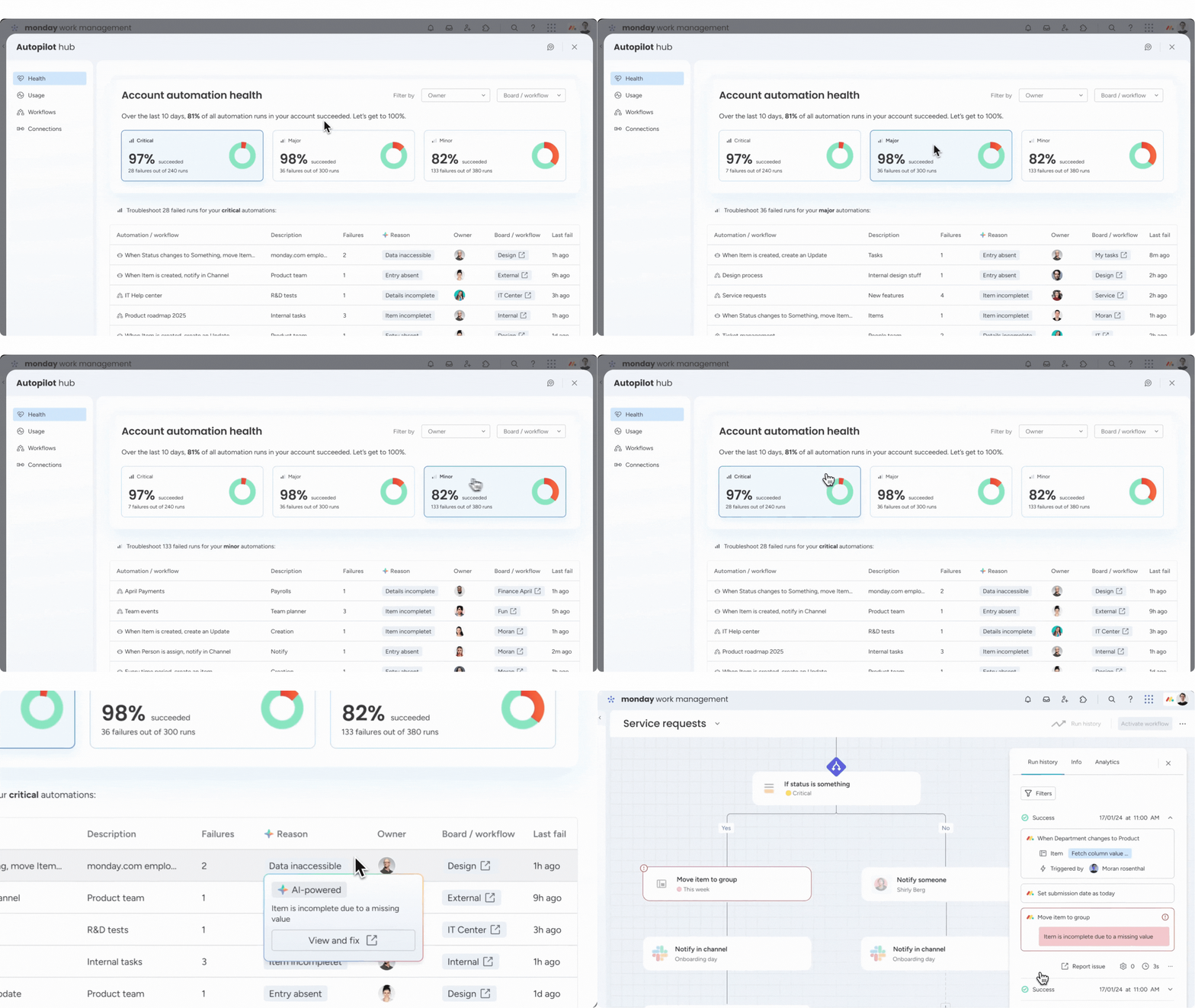
- All active automations across all boards
- Run history and error logs: Which automations fired, which ones failed?
- Consumed actions: How many of your monthly actions have been used?
- Filters and search: Filter by board, creator, or type
The Automation Hub makes it significantly easier to maintain oversight – especially in larger organizations with hundreds of boards and dozens of active automations.
Limits and Best Practices
Current Limits (as of March 2026)
| Plan | Actions per month | Boards with automations |
|---|---|---|
| Standard | 250 | Unlimited |
| Pro | 25,000 | Unlimited |
| Enterprise | 250,000 | Unlimited |
Best Practices
- Document in a dedicated board: A meta-board listing all active automations, their purpose, and the owner – or use the Automation Hub as your central overview
- Test in a sandbox board: Never experiment directly in production boards
- Monitor the Automation Hub: See all runs, errors, and action consumption at a glance
- Combine instead of complicate: Two simple automations beat one complex one nobody understands
- Use conditions: Filter triggers with conditions to avoid unnecessary actions
When Do You Need Make or n8n? (Spoiler: Sooner Than You Think)
Native automations cover 80% of use cases. But here's the reality: most teams that use monday.com seriously will sooner or later hit the limits of native automations. And that's not a bug – it's a feature.
Typical scenarios where you need a middleware platform like Make or n8n:
- Complex data transformations: JSON parsing, API calls with custom headers
- Multi-system orchestration: When more than 2 systems are involved
- Conditional logic with loops: Iterating over datasets
- Custom webhooks: Your own endpoints for external systems
- Database operations: Direct access to SQL/NoSQL
- Error handling with retry logic: Native automations offer little control here
Our recommendation: Start with native automations for the quick wins – but don't hesitate to set up a middleware solution in parallel early on. The more complex your processes become, the more you'll appreciate the flexibility of a platform like Make or n8n. The transition is easier when you know both worlds from the start, rather than having to rethink once native recipes are no longer sufficient.
For getting started with Make, we recommend our Make.com Automation Guide.
Conclusion: Automations Aren't a Feature – They Are the Platform
Using monday.com without automations is like using Excel without formulas: it works, but you're leaving 90% of the potential on the table.
The 200+ native recipes aren't a marketing gimmick. They're the reason why teams that use them consistently work measurably faster and with fewer errors. And when you hit the limits? A middleware like Make is the natural next step – not a defeat, but a sign that your processes are mature enough for the next level.
Want to know which automations would have the biggest impact on your setup? Let's figure it out in a workshop – we'll identify the quick wins and build them right in. 🚀
Related Articles

monday.com Workflows vs. Automations: What's the Difference – and When to Use Which?
monday.com has Automations AND Workflows – but what's the difference? This article explains when to use which tool and h…
Read moremonday.com Workflows Deep-Dive: When Automations Are No Longer Enough
monday.com Workflows go beyond simple automations: If/Else logic, multi-step sequences, and cross-board orchestration. T…
Read more
Gumloop Review 2026: AI Agents and Workflows Without Code
Gumloop combines AI agents with visual workflow automation – completely no-code. Here's what the platform can do, what i…
Read more Deep Dive
Workflow Automation Explained: How Teams Eliminate Repetitive Work
Workflow automation vs. simple automation: What's the difference, why it matters, and how make.com, n8n, and monday.com …
Read more
Sprint Planning with monday Dev – the 2026 Deep Dive
How to make sprint planning with monday Dev actually productive: concrete board setups, role model for Scrum & Kanban, e…
Read more
The 10 Best monday MCP Prompts for Your Daily Work
Copy-paste-ready prompts for Claude, Cursor, and ChatGPT – to control monday.com via natural language. From board creati…
Read more
monday Vibe Pricing 2026 – The Big May 6 Update Explained
On May 6, 2026, monday.com fundamentally changed Vibe pricing: publishing is now bundled with the AI Credits add-on, eve…
Read more
monday Vibe Q1/2026: A Year's Backlog in One Quarter – The Biggest Update Since Launch
monday.com shipped an entire year's backlog for Vibe Apps in Q1/2026. 19+ features, 26 A/B tests, mobile support, Gmail/…
Read moremonday Vibe Apps – Build Custom Mini-Applications Without Code (2026 Guide)
monday Vibe Apps let anyone build custom mini-applications using natural language prompts – no code, directly within mon…
Read more